Possible Power Issues in the Vehicle
Several causes may explain a power issue with the instrument in the vehicle
Possible Causes
? Faulty OBD port fuse
The fuse associated with the vehicle’s OBD port may be blown.
? Connector corrosion
Corrosion may be present:
- at the OBD connector
- or at the USB connector
⚠️ Damaged cable
The power cable may be cut, worn, or damaged.
? Defective instrument connector
The instrument connector may be damaged or corroded.
⚙️ Incorrect instrument configuration
An incorrect configuration may give the impression that the instrument is not powering on.
? Use of a vehicle USB port
If the instrument has been connected to a vehicle USB port, it may:
- no longer function properly
- or appear not to power on
Using a Vehicle USB Port
⚠️ Important
The TL1000 will not work when connected to a vehicle multimedia USB port.
Why?
Vehicle USB ports:
are typically turned off with the ignition (non-constant power)
are connected to the vehicle’s radio system
The radio attempts to communicate with the instrument, which:
prevents data recording
makes the instrument behave as if it were connected to a computer
➡️ Refer to the guide:
Instrument does not turn on when connected to a car USB port
OBD Power Cable Verification
If you are using the provided OBD power cable, proceed by elimination to identify the source of the issue:
Instrument settings
OBD cable (properly connected and condition of both connectors)
Instrument (condition of the connector)
Vehicle OBD connector itself and its fuse
Step 1 — Verify settings
Check the instrument’s internal configuration
➡️ Guide: How to check instrument parameters
If everything is correct, proceed to the next step.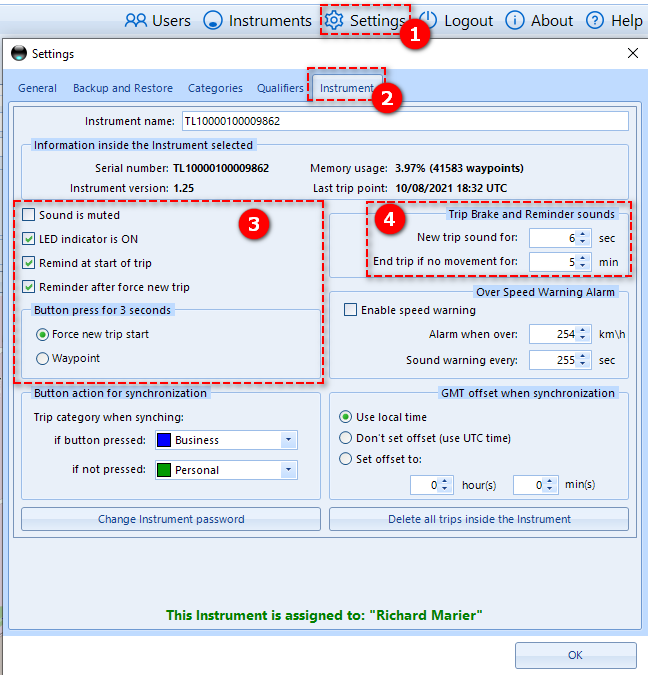
Step 2 — Test with standard USB power
Connect the instrument to a standard USB charger (e.g., phone charger) using the USB cable.
Place the instrument near a window to allow GPS signal reception.
Results:
❌ Instrument does not power on:
➝ Refer to the Problem solving guide (trouble shooting)
✅ Instrument powers on:
➝ The issue is likely related to:the OBD cable
or the vehicle’s OBD power supply
➝ Proceed to Step 3
Step 3 — Verify the vehicle OBD port
Check the fuse associated with the vehicle’s OBD port.
Using a measuring device, confirm the presence of 12 VDC at the OBD connector.
Test the OBD power cable in another vehicle.
Results:
If the cable does not work in another vehicle:
➝ The cable is likely defective
➡️ Replace the cable: Get a replacement cable here
Was this article helpful?
That’s Great!
Thank you for your feedback
Sorry! We couldn't be helpful
Thank you for your feedback
Feedback sent
We appreciate your effort and will try to fix the article